

How AI Meeting Summaries Turn Long Conversations Into Clear Action Items
Meetings are where ideas are shared, decisions are made, and projects move forward. But once a meeting ends, many teams face the same problem: the conversation was useful, but the follow-up is unclear.
Who owns the next step?
What decisions were actually made?
Which points should be shared with the wider team?
And where did that important detail appear in the recording?
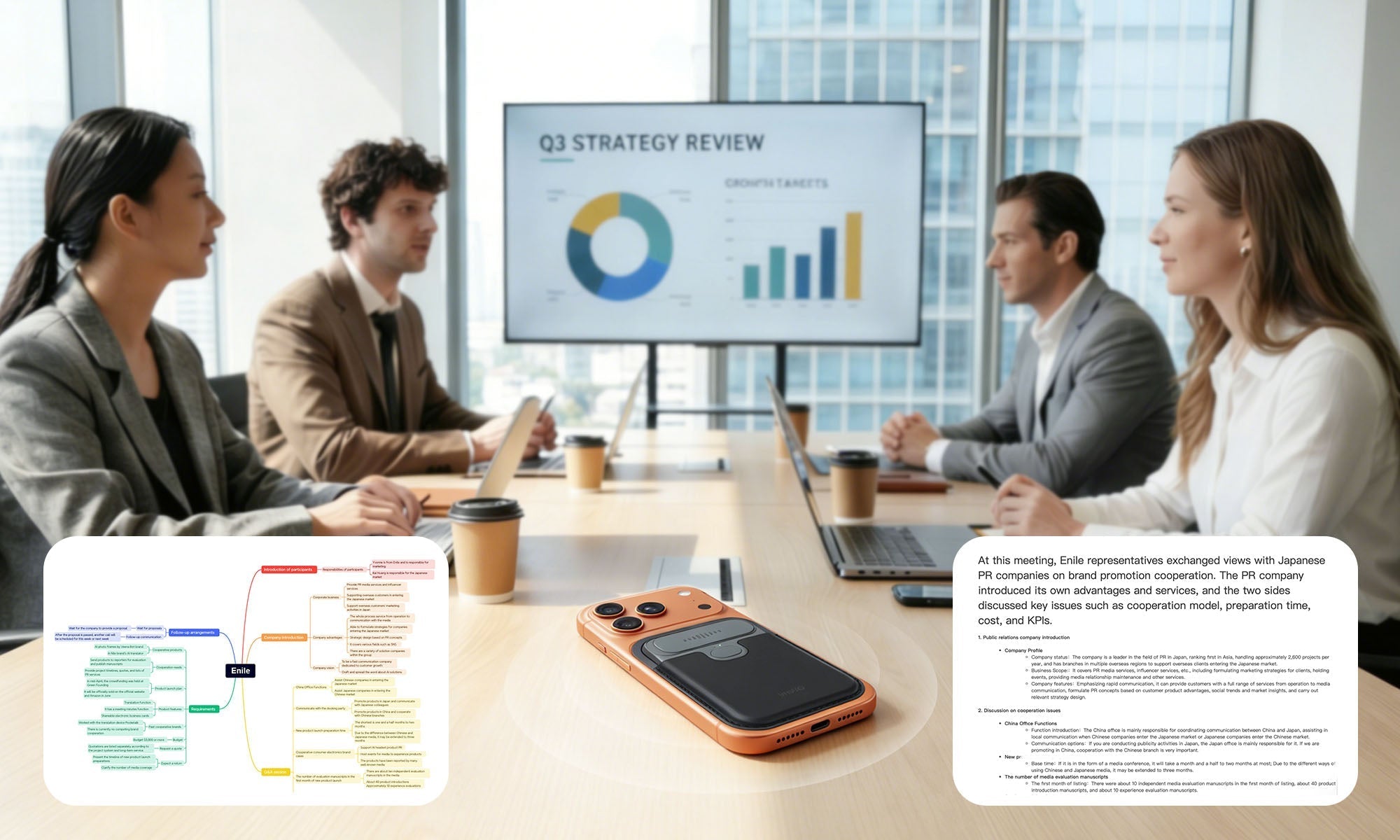
This is why AI meeting summaries are becoming an essential part of modern work. Instead of relying on handwritten notes or listening back to long recordings, an AI meeting recorder can help turn conversations into transcripts, summaries, mind maps, and action items.
For teams working across languages, the value is even bigger. A tool like InnAIO TransNote AI Translation Recorder is designed not only to record meetings, but also to help translate conversations, generate AI meeting notes, and organize multilingual discussions into clearer next steps.

What Is an AI Meeting Summary?
An AI meeting summary is an automatically generated overview of a meeting based on the recorded conversation or transcript.
Instead of giving you only a full word-for-word transcript, AI can identify the most important parts of a meeting and organize them into a more useful format, such as:
-
Key discussion points
-
Meeting decisions
-
Action items
-
Follow-up tasks
-
Speaker-labeled notes
-
Project updates
-
Mind maps
-
Searchable meeting records
The goal is simple: help you understand what happened in the meeting faster, without reviewing the entire recording manually.
For busy teams, this can save time and reduce the risk of missing important details.
Why Traditional Meeting Notes Are Not Enough
Manual meeting notes are useful, but they are also limited.
When someone takes notes during a meeting, they are doing two jobs at once: participating in the conversation and trying to capture information. This often leads to incomplete notes, missed details, or summaries that reflect only one person’s interpretation of the discussion.
Traditional recordings solve part of the problem, but they create another one. A one-hour recording still takes time to review. If the recording includes multiple speakers, different accents, or more than one language, finding key points becomes even harder.
That is where an AI meeting recorder and AI meeting notetaker can help.
Instead of only storing audio, an AI meeting tool can help you capture, transcribe, summarize, and organize the meeting after it ends.
The Core Benefits of AI Meeting Summaries
1. Save Time After Every Meeting
Long meetings often contain useful information, but not every sentence needs to be reviewed again.
AI meeting summaries help users quickly understand the main points without listening to the full recording. This is especially helpful for managers, sales teams, project teams, and anyone who attends multiple meetings each day.
Instead of spending 30–60 minutes reviewing a meeting, users can start with a structured summary and only go back to the transcript or audio when more context is needed.
2. Capture Decisions More Clearly
One of the biggest problems after a meeting is confusion around decisions.
People may remember the discussion differently, or a key decision may be buried in the middle of a long conversation. AI-generated meeting notes can help identify decisions and organize them into a clearer format.
This helps teams answer questions like:
-
What did we agree on?
-
What changed from the previous plan?
-
Which proposal was approved?
-
Which issue needs more discussion?
Clearer decisions lead to better follow-up.
3. Turn Conversations Into Action Items
A meeting summary is useful, but action items are what make the meeting productive.
AI can help extract tasks from the conversation, making it easier to understand what needs to happen next. This is useful for project reviews, client meetings, sales calls, team standups, interviews, lectures, and business negotiations.
Good action items should include:
-
The task
-
The owner
-
The deadline, if mentioned
-
The context behind the task
With the right AI meeting notetaker, your meeting record becomes more than a transcript. It becomes a practical action plan.
4. Make Meeting Notes Searchable
Searchable transcripts and AI summaries help users find important information faster.
For example, instead of scrolling through pages of handwritten notes or replaying the entire recording, you can search for a project name, customer request, product issue, or decision keyword.
This turns meeting records into a searchable knowledge base.
Over time, this can help teams review past decisions, onboard new team members, and keep project information organized.
5. Support Multilingual Teams
For global teams, meeting documentation can be more difficult. A single meeting may include multiple languages, accents, and communication styles.
An AI translation recorder can help bridge this gap by combining translation, recording, transcription, and summarization in one workflow.
TransNote is built for this kind of multilingual communication. It supports real-time AI translation, multilingual meeting recording, transcripts, AI summaries, speaker labels, and mind maps, helping users move from cross-language conversation to organized meeting output.

How AI Meeting Summaries Work
The process usually includes four steps.
Step 1: Capture the Meeting Audio
The first step is recording the meeting clearly.
For in-person meetings, audio quality matters. People may sit at different distances from the recorder, speak at different volumes, or talk over one another. A strong microphone system helps capture the conversation more reliably.
TransNote uses a 5-mic recording system designed for meeting rooms, calls, interviews, lectures, and business conversations. It includes 1 bone-conduction microphone and 4 omnidirectional microphones, with a pickup range of up to 5 m.
This makes it easier to capture multiple speakers in real meeting environments.
Step 2: Convert Audio Into Text
After the meeting is recorded, AI transcription converts speech into text.
A transcript gives users a complete record of what was said. This is useful when you need to check exact wording, review details, or confirm who mentioned a specific point.
For multilingual meetings, transcription can be especially useful because it helps turn spoken discussion into a more reviewable format.

Step 3: Add Speaker Labels and Structure
A transcript is easier to use when it is organized.
Speaker labels help identify who said what. This is important in meetings with multiple participants, especially when discussing responsibilities, decisions, objections, or customer feedback.
Instead of reading a block of text, users can review the conversation by speaker and follow the flow of the meeting more clearly.
Step 4: Generate Summaries, Mind Maps, and Action Items
Once the transcript is ready, AI can generate structured meeting outputs.
Depending on the use case, this may include:
-
Short meeting summary
-
Detailed meeting notes
-
Key decisions
-
Follow-up tasks
-
Action items
-
Mind maps
-
Interview summaries
-
Sales call notes
-
Lecture notes
-
Project review notes
For complex discussions, mind maps can be especially helpful because they turn scattered ideas into a visual structure.

Common Use Cases for AI Meeting Summaries
Business Meetings
Business meetings often include decisions, plans, and next steps. AI summaries help teams capture the meeting outcome and reduce the need for long follow-up emails.
Sales Calls
Sales teams can use AI meeting notes to capture customer pain points, objections, feature requests, pricing discussions, and next steps. This helps improve follow-up quality and keeps customer information organized.
Project Reviews
Project meetings often include many updates from different people. AI summaries can help organize progress, blockers, deadlines, and ownership.
Interviews
For interviews, AI transcription and summaries help users review answers, compare candidates, and extract key insights without relying only on memory.
Lectures and Training
Students, trainers, and professionals can use AI summaries to review long sessions more efficiently. Mind maps can help organize complex topics into a clearer structure.
Multilingual Meetings
In multilingual business settings, AI meeting summaries can help reduce communication gaps. When translation, recording, transcription, and summarization are connected, teams can review discussions more clearly after the meeting ends.
What to Look for in an AI Meeting Summary Tool
Not all AI meeting tools are the same. If you are choosing an AI meeting recorder or AI meeting notetaker, consider these features.
Clear Recording Quality
A meeting summary is only as good as the audio behind it. For in-person meetings, look for a device with a strong microphone system and reliable pickup range.
Transcription Support
AI transcription helps create a complete meeting record. This is useful when you need to search, quote, review, or share exact meeting details.
Speaker Labels
Speaker labels make meetings easier to review, especially when multiple people are involved.
AI Summaries and Templates
Different meetings need different formats. A sales call summary is not the same as a project review or interview summary. AI templates can help generate outputs that match the meeting scenario.
Action Items
A strong AI meeting summary tool should help identify next steps, not just summarize the discussion.
Mind Map Output
Mind maps are useful for complex meetings, brainstorming sessions, and long discussions with many connected ideas.
Multilingual Support
For global business users, multilingual transcription, translation, and meeting summaries can be a major advantage.
Portability
A lightweight, card-sized device is easier to carry to meetings, events, business trips, and interviews.
Why TransNote Is Built for AI Meeting Summaries
InnAIO TransNote is designed for users who need more than a basic voice recorder.
It combines AI translation, meeting recording, AI transcription, speaker-labeled notes, AI summaries, mind maps, and digital business card exchange in one ultra-thin device.
Key features include:
-
AI meeting recording
-
5-mic recording system
-
Up to 5 m pickup range
-
32GB local storage
-
Offline recording support
-
AI transcription
-
Speaker labels
-
AI meeting summaries
-
Mind map output
-
Follow-up tasks and action items
-
Real-time AI translation across 140+ languages
-
Cross-app translation
-
NFC digital business card exchange
-
Smart voice input for chats, emails, notes, and work documents
For international professionals, this workflow is especially valuable. You can use one device to capture the meeting, translate the conversation, generate notes, and turn the discussion into a clear action plan.

AI Meeting Summary vs. Manual Notes
Manual notes are still useful, but they depend heavily on the person taking them.
AI meeting summaries offer a different advantage: they help create a structured record based on the full conversation. This can reduce the risk of missing key points and make it easier to share meeting outcomes.
Here is a simple comparison:
| Feature | Manual Notes | AI Meeting Summary |
|---|---|---|
| Captures full conversation | Limited | Yes, with recording and transcript |
| Searchable later | Usually no | Yes |
| Speaker labels | Manual | Supported |
| Action item extraction | Manual | Supported |
| Mind map output | Manual | Supported |
| Works well for long meetings | Difficult | More efficient |
| Useful for multilingual meetings | Limited | Stronger with translation support |
The best workflow is not always replacing manual notes completely. In many cases, users can take quick personal notes during the meeting while the AI meeting recorder captures the full discussion for later review.
Best Practices for Better AI Meeting Summaries
To get better AI meeting summaries, follow a few simple habits.
Place the Device Properly
For in-person meetings, place the recorder where it can capture all speakers clearly. If possible, keep it near the center of the conversation.
Reduce Background Noise
A quieter environment improves transcription and summary quality. Try to reduce overlapping voices, loud background music, or unnecessary noise.
Mention Key Decisions Clearly
If you want action items to be captured accurately, state decisions and owners clearly during the meeting.
For example:
“Sarah will send the updated proposal by Friday.”
This makes the next step easier for AI to identify.
Use the Right Summary Format
Different meetings need different outputs. A client call may need action items. A lecture may need topic-based notes. A brainstorming session may benefit from a mind map.
Review Before Sharing
AI summaries are helpful, but important business records should still be reviewed before sharing with clients, partners, or internal teams.
Final Thoughts
AI meeting summaries are changing the way teams manage conversations.
Instead of ending a meeting with scattered notes and unclear follow-ups, teams can now turn recordings into transcripts, summaries, mind maps, and action items. This helps users save time, improve accountability, and make better use of every conversation.
For multilingual teams, the value is even greater. When translation, recording, transcription, and summarization work together, meetings become easier to understand and easier to act on.
If your work involves international meetings, sales calls, interviews, lectures, or cross-language communication, InnAIO TransNote AI Translation Recorder can help you capture conversations and turn them into clear next steps.
FAQ: AI Meeting Summaries
What is an AI meeting summary?
An AI meeting summary is an automatically generated overview of a meeting based on the audio recording or transcript. It highlights key points, decisions, and action items.
Can AI summarize multilingual meetings?
Yes. With the right AI translation recorder or AI meeting notetaker, multilingual meetings can be recorded, transcribed, translated, and summarized for easier review.
What is the difference between AI transcription and AI meeting summary?
AI transcription converts spoken words into text. An AI meeting summary organizes that text into key points, decisions, action items, and follow-up notes.
Can TransNote generate meeting notes and mind maps?
Yes. TransNote is designed to help turn recordings into transcripts, speaker-labeled notes, AI summaries, mind maps, and follow-up tasks.
Is an AI meeting recorder useful for in-person meetings?
Yes. A dedicated AI meeting recorder can capture face-to-face conversations more reliably than basic manual notes, especially in multi-speaker meeting environments.


