
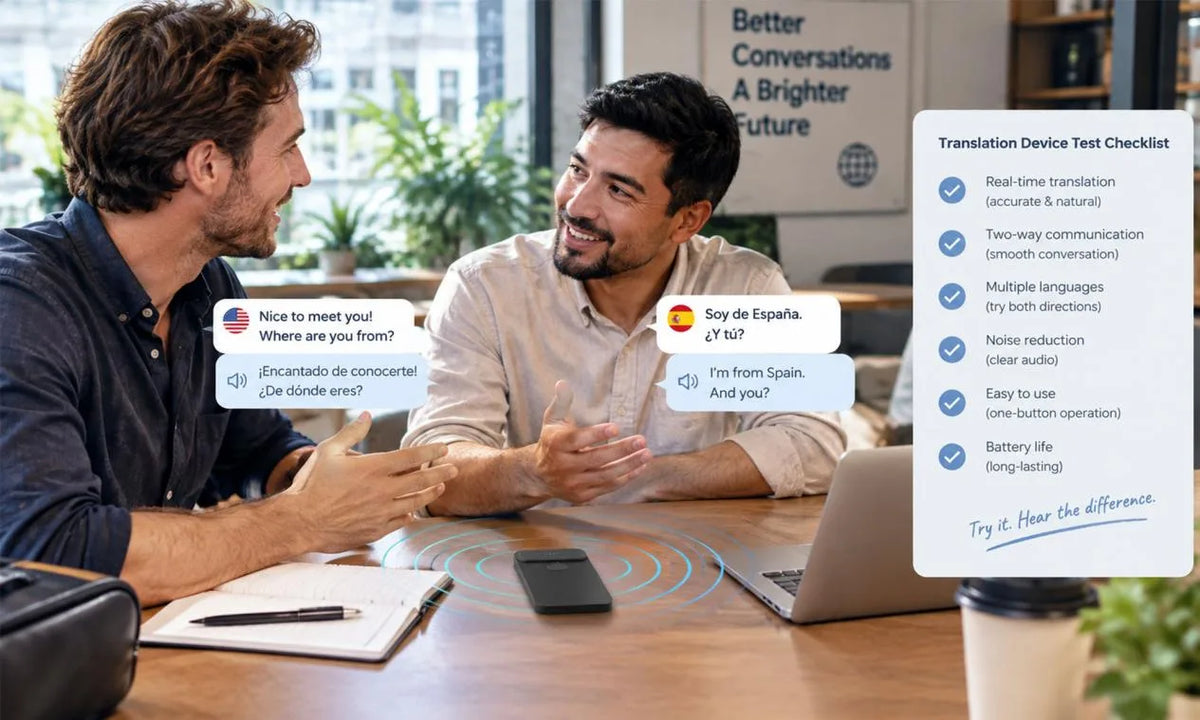
A translator device deserves a real-world test before checkout because specifications alone rarely show how a conversation will feel. Test the language pairs, speaking conditions, phone connection, and support terms that shape your own routine.
Bring your phone, a short phrase list, and a realistic conversation partner when possible. A structured test turns a broad product category into a clear purchase decision.
Which Language Pairs and Conversation Modes Do You Need?
Start with the exact language pairs, regional varieties, and communication modes you expect to use. Your needs may include face-to-face talk, travel help, calls, chat, voice messages, or text translation.

Language Coverage
Write down each source and target language, including any regional form that matters in your work or family life. Confirm both sides of every priority pair before you test a device in person.
Conversation Mode
Match the device mode with the situation: face-to-face speech for travel, call support for remote work, or cross-app text for messaging. A portable translator has value when its practical modes match the conversations you actually have.
Product Fit
Our InnAIO TransNote page lists translation across 140+ languages along with live, cross-app, group, call, and offline translation features. Use published language support as an initial filter, then test the exact conversations that matter to you.
Language coverage narrows the field before you spend time on a demonstration. Mode fit tells you whether an ai translator device belongs in your daily communication routine.
Test a Short Two Way Conversation Before You Buy
A short two-way conversation gives you direct evidence about turn-taking, response timing, and clarity. Use the same script for every device so each trial has a fair basis.
- Ask one person to speak each language and use a simple request, a longer explanation, a name, a number, and a polite correction.
- Watch whether each person knows when to speak and whether the device separates turns cleanly.
- Check whether the translated response keeps the essential meaning and offers a practical way to correct a phrase.
- Repeat the script with another device under the same sound and connection conditions.

A voice translator device should support a natural exchange without frequent stops for menus or rephrasing. Keep your notes from each trial so memory does not blur the result later.
Check Call and Chat Compatibility With Your Phone
Your phone becomes part of the translator test when you expect to use calls, messaging, or a companion app. Test the device with your regular phone model, operating system version, chat app, cable, and wireless accessories.
| Checkpoint | What to Test | Why It Matters |
|---|---|---|
| Account access | Sign-in and account recovery | Supports continued access after a phone change |
| Call and chat | Your regular communication mode | Shows whether the device fits daily habits |
| Connection | Pairing, reconnecting, Wi-Fi, and mobile data | Reveals friction during real use |
| Audio path | Phone speaker, earbuds, or car system | Checks where translated audio appears |
The Federal Trade Commission’s app-permission guidance recommends checking what information an app wants to access before download. Compatibility is more than a label on a box because your own phone habits determine whether the workflow feels practical. Keep a brief record of setup friction so you can compare it with other devices.
See How the Device Handles Noise, Accents, and Fast Speech
Noise, accents, and fast speech reveal how an AI translator device behaves outside a quiet demo table. Test one controlled change at a time so you can identify the condition that affects understanding.
- Start in a quiet place with normal pace and ordinary volume.
- Add common café or street noise when the demonstration setting permits.
- Use a normal regional accent, a proper name, a place name, and a fast follow-up question.
- Check whether the device asks for a repeat, preserves the core meaning, and presents readable text for correction.

The NIDCD guidance on noise exposure notes that sound volume and exposure duration both matter for hearing health, so keep headphone levels moderate during longer tests. A realistic sound test tells you which speaking habits will help after purchase. It also gives you a clearer expectation for noisy travel and work settings.
Review Device Setup, App Requirements, and Feature Access
Review setup, power, connectivity, feature access, and purchase terms before payment. A good demo can still leave unanswered questions about the work required after you take the device home.
- Complete setup from a fresh start and check how quickly you can reach language settings and help.
- Inspect the charging connector, battery indicator, and steps needed after a restart.
- Ask which features work on the device, which need a phone, and which need a network connection.
- Check basic and paid feature access, then record any recurring charge or usage limit.
- Read the seller’s return and warranty terms and save a copy with your receipt.
InnAIO lists a 30-day return guarantee and 12-month warranty for eligible items, subject to the published policies. A complete setup review keeps surprises from appearing after checkout. Write unanswered questions beside your receipt so you can resolve them during the return window.
Buy a Translator Device That Passes Your Real World Test
Buy a translator device after it passes your language, conversation, phone, sound, and setup checks.
Use your return window for a final home test with a real contact and keep your receipt and order information together. Keep the same checklist when you assess a compact tool for multilingual conversation, notes, and communication tasks. A device that passes your own checklist can support more confident conversations after purchase.
FAQs about Translator Device Testing
Q1: What Should You Bring When Testing a Translator Device?
Bring your own phone, charging cable, earbuds if you use them, and a written set of phrases for two languages. Add names, addresses, numbers, and a work-related or travel-related request. Familiar phrases reveal whether the interface, sound pickup, and translation style fit your real conversations better than a generic store demo.
Q2: How Can You Compare Two Translator Devices Fairly?
Use a cost-and-support scorecard after the conversation test. Record purchase price, recurring charges, included accessories, warranty length, software-update approach, and support contact options for each device. Give every factor a weight that reflects your travel, work, or family use. A fair comparison includes the help and access you may need long after checkout.
Q3: Is a Store Demo Enough Before You Buy?
No. A store demo shows basic controls, yet it rarely reflects your home, workplace, travel route, accents, or phone setup. Use the demo to narrow choices, then read the return policy and perform a fuller test during the return period. Keep the packaging and accessories in the condition required for a return.
Q4: What Should You Test on the Phone You Plan to Use?
If your intended workflow uses an app, check how it fits your phone’s accessibility settings, storage limits, language and region settings, and upcoming operating-system updates. Open the help center on that phone and confirm that account recovery works with the email address or sign-in method you use. A device can pair successfully yet still create friction when your phone changes or fills up.
Q5: What Should You Check During the Return Window?
Keep a dated record of any fault, support conversation, order number, serial number, and return instructions. Ask how the seller wants accessories, packaging, and proof of purchase handled, then save delivery tracking if a return becomes necessary. Clear documentation helps you follow the stated return process and protects your record of the transaction.


