

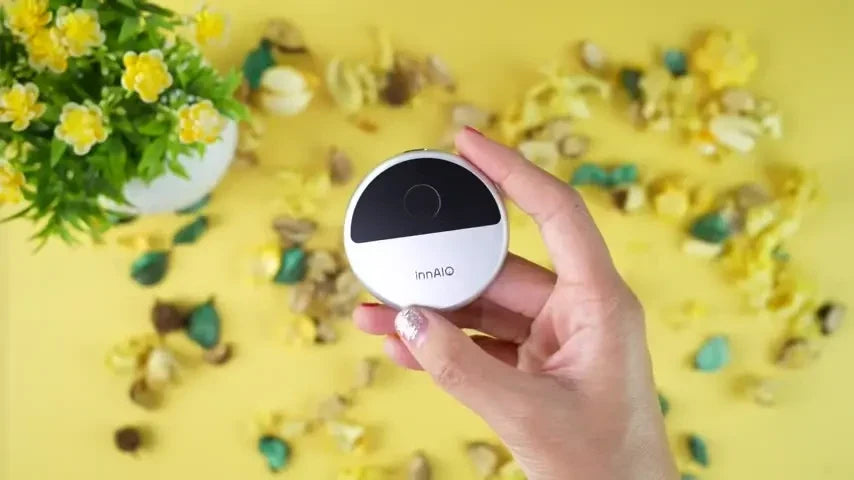
Language barriers rarely arrive as neat translation exercises. They appear while ordering food, joining a call, following a lecture, or trying to understand a fast reply in a noisy place. The InnAIO T10 is designed for those moments: a small, phone-connected AI translator that combines live conversation tools with call, camera, text, meeting, and offline modes. The source review is strongly positive, and the feature set is broad, but the best buying decision depends on how much you value portability and app-based flexibility over a fully standalone device.

InnAIO T10 at a Glance
The T10 is a compact companion rather than a traditional handheld translator with its own large screen. It attaches magnetically to a compatible phone or tablet and uses the InnAIO Pro app as the main interface. That arrangement keeps the hardware light while letting the phone handle display, controls, saved conversations, and advanced tools.
According to the source, the unit weighs about 30 grams and charges through USB-C. The source also reports around 15 hours of continuous speech use and more than three months of standby time. Those figures were not independently benchmarked in the video, so frequent travelers should treat them as stated performance and plan charging around their own usage.
Compact Hardware and Quick Setup
Setup is presented as a short process: attach the device, pair it with the InnAIO Pro app, choose the languages, and configure any personal voice options. The source completes the basic pairing flow in less than a minute and describes the matte device as light but secure in the hand.
This design is useful if you already carry a phone everywhere and do not want another bulky screen in your bag. It also creates a clear dependency. Your phone, app permissions, operating-system compatibility, and current software version all become part of the experience. Buyers should confirm compatibility with the exact phone model they intend to use.
How the Translation Modes Fit Real Conversations
Face-to-Face and Real-Time Translation
The central mode listens to speech, translates it, and displays the result with audio. The source states support for 130 languages and roughly 0.3-second latency. Its café demonstration shows why speed matters: when translated lines arrive close to the original speech, both people can keep their attention on the conversation instead of waiting through long pauses.

Face-to-face mode gives each participant access to their own language and saves the conversation as text. That is valuable when a name, direction, time, or decision needs to be checked later. The source also reports good handling of accents and background noise, although it does not include a controlled comparison across languages or sound conditions.
Cross-App and Call Translation
Cross-app mode is intended for messaging workflows. In the demonstration, the translator can be used with apps such as WhatsApp or WeChat, reducing the need to copy text back and forth between separate tools. Call translation provides a choice between live subtitles and speech-to-speech output, so users can prioritize visible text or a more conversational audio exchange.
These modes are especially relevant for international teams and multilingual families because communication does not always happen in the same room. The practical question is not simply how many languages appear on a list, but whether the specific language pair, app, call environment, and accent you need perform reliably.
Voice, Camera, and Meeting Tools
Voice cloning adds a personalized output option. The source describes recording up to about 60 seconds of clear audio so translated speech can retain a familiar tone across languages. This can make playback feel less mechanical, but users should make sure everyone involved understands when a cloned voice is being used and should review the app's current privacy controls before storing voice data.
Photo translation targets menus, signs, and documents. Point the phone camera at the text and the app places a translation over the image while keeping the original visible. That side-by-side context can be more useful than a bare translated sentence because it helps you match each result to the correct line or label.

Meeting mode moves beyond immediate translation. It records group discussions, creates a transcript, summarizes key points, and can arrange ideas into mind-map-style notes. Audio or text files can then be saved for later use. Students and international project teams may find this combination more valuable than a single-purpose travel translator, provided they review the generated record rather than treating an automated summary as a perfect account.
Where the T10 Makes the Most Sense
The strongest use cases are situations that shift between spoken and written language. A traveler may need face-to-face translation at a counter, photo translation for a menu, and offline support away from reliable service. A professional may move from a multilingual call to a meeting transcript and then use text mode for a follow-up message.
The small magnetic format also favors people who already work from a phone. Instead of learning a separate device interface, they can use one app dashboard for real-time translation, calls, voice cloning, photos, text, and meeting records. That breadth is the product's clearest advantage in the source review.
Limits to Consider Before Buying
The T10 should not be judged only by the headline language count. Translation quality can vary by language pair, accent, speaking pace, specialist vocabulary, and background noise. The featured test is useful but not a formal accuracy benchmark, so anyone relying on translation for legal, medical, safety-critical, or high-value business decisions should arrange qualified human review.
Offline translation is available for common language pairs, while wider coverage was described as an expanding feature. Check the current offline-language list instead of assuming every supported online language works without a connection. It is also sensible to confirm subscription terms, storage controls, and export options in the latest app version.
InnAIO T10 Review Verdict
The InnAIO T10 is most persuasive as a lightweight translation toolkit for people who communicate across several channels. Its combination of rapid conversation translation, call support, camera input, meeting notes, and offline options gives it more range than a basic phrase translator. The source's enthusiastic verdict is consistent with the demonstrated workflow.
It is a good fit for travelers, students, multilingual households, and international teams that are comfortable using a companion app. Buyers who need a completely standalone device, a formally verified accuracy level, or guaranteed offline coverage for every language should verify those requirements before ordering.
What To Know Before Choosing the InnAIO T10
Q1. Is the InnAIO T10 a standalone translator?
No. It is designed as compact hardware that works with the InnAIO Pro app on a compatible phone or tablet. The phone supplies the main screen and controls, so device compatibility and app access are essential.
Q2. Who is the InnAIO T10 best suited to?
It is best suited to travelers, students, multilingual families, and international professionals who want conversation, call, photo, text, and meeting tools in one portable system. People who prefer a separate translator with its own display may favor a different format.
Q3. Can the InnAIO T10 translate without internet access?
Yes, for supported offline language pairs. Offline coverage is narrower than the full online language range, so check the current list for the exact languages needed before a trip or remote assignment.
Q4. What should buyers check before ordering?
Confirm phone compatibility, required app permissions, current language and offline coverage, subscription terms, privacy controls, and file-export options. For critical communication, plan for human verification regardless of the translation mode.


